Highly Available Clusters
High Availability (HA) in Kubernetes ensures your cluster remains operational even when components fail. This involves running multiple instances of control plane components and using load balancers.
更多信息: https://kubernetes.io/docs/setup/production-environment/tools/kubeadm/high-availability/
Why High Availability?
Benefits:
No single point of failure: Cluster continues operating if a control plane node fails
Zero downtime: Perform maintenance without cluster downtime
Better performance: Distribute load across multiple API servers
Production readiness: Required for critical production workloads
What needs to be HA:
Control plane components: API server, Controller Manager, Scheduler
etcd: Distributed key-value store (requires odd number of nodes: 3, 5, 7)
Load balancer: Distribute traffic to multiple API servers
Worker nodes: Multiple workers for application redundancy
HA Topology Options
Option 1: Stacked etcd Topology
etcd runs on the same nodes as control plane components.
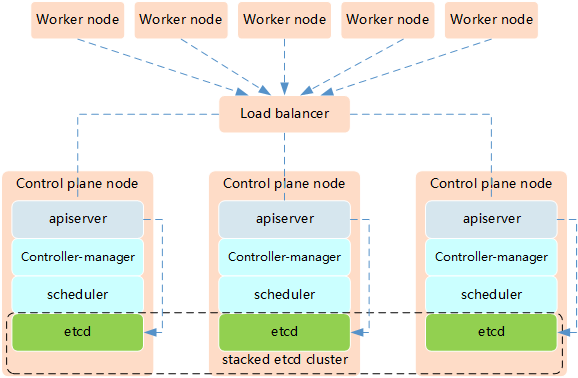
Characteristics:
Simpler setup: Fewer nodes required (minimum 3 control plane nodes)
Easier management: etcd is co-located with control plane
Higher risk: If a node fails, you lose both etcd and control plane
Resource efficient: Requires fewer machines
Minimum Requirements:
3 control plane nodes (each running API server, Controller Manager, Scheduler, etcd)
1 load balancer
Multiple worker nodes
Pros:
Less infrastructure complexity
Easier to set up and maintain
Lower cost (fewer machines)
Cons:
Coupled failure domains
Less resilient than external etcd
Option 2: External etcd Topology
etcd runs on separate dedicated nodes.
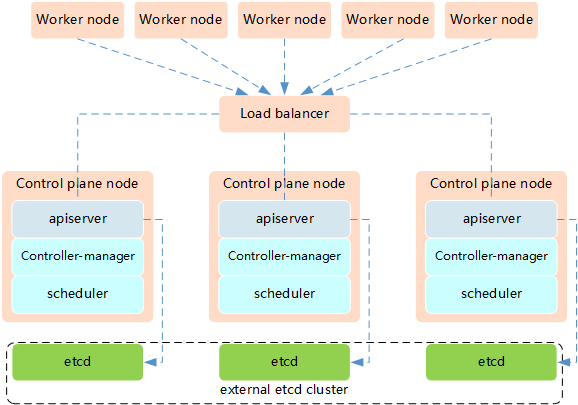
Characteristics:
More resilient: etcd and control plane have independent failure domains
Better performance: Dedicated resources for etcd
More complex: Requires more nodes and configuration
Production grade: Recommended for critical production environments
Minimum Requirements:
3 etcd nodes (dedicated for etcd only)
2+ control plane nodes (running API server, Controller Manager, Scheduler)
1 load balancer
Multiple worker nodes
Pros:
Independent failure domains
Better performance at scale
More resilient architecture
Cons:
More complex setup
Higher infrastructure cost
More nodes to manage
Setting Up HA Cluster with kubeadm
Prerequisites
For all nodes:
# Configure required kernel modules
$ cat <<EOF | sudo tee /etc/modules-load.d/k8s.conf
overlay
br_netfilter
EOF

$ sudo modprobe overlay
$ sudo modprobe br_netfilter

# Set up required sysctl params
$ cat <<EOF | sudo tee /etc/sysctl.d/k8s.conf
net.bridge.bridge-nf-call-iptables  = 1
net.bridge.bridge-nf-call-ip6tables = 1
net.ipv4.ip_forward                 = 1
EOF

$ sudo sysctl --system
Install container runtime, kubeadm, kubelet, kubectl on all nodes
# See the k8s-install section for detailed installation steps
$ sudo apt-get update
$ sudo apt-get install -y containerd kubeadm kubelet kubectl
Step 1: Set Up Load Balancer
You need a load balancer to distribute traffic across API servers.
Option A: Using HAProxy
Install HAProxy on a dedicated node:
$ sudo apt-get install -y haproxy
Configure HAProxy (/etc/haproxy/haproxy.cfg):
frontend kubernetes-frontend
    bind *:6443
    mode tcp
    option tcplog
    default_backend kubernetes-backend

backend kubernetes-backend
    mode tcp
    option tcp-check
    balance roundrobin
    server control-plane-1 192.168.1.11:6443 check fall 3 rise 2
    server control-plane-2 192.168.1.12:6443 check fall 3 rise 2
    server control-plane-3 192.168.1.13:6443 check fall 3 rise 2
Restart HAProxy:
$ sudo systemctl restart haproxy
$ sudo systemctl enable haproxy
Option B: Using nginx
stream {
    upstream kubernetes {
        server 192.168.1.11:6443;
        server 192.168.1.12:6443;
        server 192.168.1.13:6443;
    }

    server {
        listen 6443;
        proxy_pass kubernetes;
    }
}
Step 2: Initialize First Control Plane Node
Create a kubeadm config file (kubeadm-config.yaml):
apiVersion: kubeadm.k8s.io/v1beta3
kind: ClusterConfiguration
kubernetesVersion: v1.30.0
controlPlaneEndpoint: "LOAD_BALANCER_DNS:6443"  # Your load balancer address
networking:
  podSubnet: "10.244.0.0/16"
---
apiVersion: kubeadm.k8s.io/v1beta3
kind: InitConfiguration
nodeRegistration:
  criSocket: unix:///var/run/containerd/containerd.sock
Initialize the cluster:
$ sudo kubeadm init --config=kubeadm-config.yaml --upload-certs
Save the output! You’ll need the join commands for control plane and worker nodes.
# Set up kubectl for the admin user
$ mkdir -p $HOME/.kube
$ sudo cp -i /etc/kubernetes/admin.conf $HOME/.kube/config
$ sudo chown $(id -u):$(id -g) $HOME/.kube/config

# Install a CNI plugin (e.g., Flannel)
$ kubectl apply -f https://raw.githubusercontent.com/coreos/flannel/master/Documentation/kube-flannel.yml
Step 3: Join Additional Control Plane Nodes
On each additional control plane node, run the join command from the init output:
$ sudo kubeadm join LOAD_BALANCER_DNS:6443 --token <token> \
    --discovery-token-ca-cert-hash sha256:<hash> \
    --control-plane --certificate-key <certificate-key>
If you lost the join command:
# On the first control plane node, generate a new token
$ kubeadm token create --print-join-command

# Upload certificates again (valid for 2 hours)
$ sudo kubeadm init phase upload-certs --upload-certs
Step 4: Join Worker Nodes
On each worker node:
$ sudo kubeadm join LOAD_BALANCER_DNS:6443 --token <token> \
    --discovery-token-ca-cert-hash sha256:<hash>
Step 5: Verify HA Setup
# Check all nodes
$ kubectl get nodes
NAME              STATUS   ROLES           AGE   VERSION
control-plane-1   Ready    control-plane   10m   v1.30.0
control-plane-2   Ready    control-plane   8m    v1.30.0
control-plane-3   Ready    control-plane   6m    v1.30.0
worker-1          Ready    <none>          5m    v1.30.0
worker-2          Ready    <none>          5m    v1.30.0

# Check control plane pods
$ kubectl get pods -n kube-system -o wide | grep -E "kube-apiserver|etcd"

# Verify etcd cluster health
$ kubectl exec -it -n kube-system etcd-control-plane-1 -- etcdctl \
    --cert=/etc/kubernetes/pki/etcd/server.crt \
    --key=/etc/kubernetes/pki/etcd/server.key \
    --cacert=/etc/kubernetes/pki/etcd/ca.crt \
    member list

# Check cluster health
$ kubectl get componentstatuses
External etcd Setup
For external etcd topology, set up etcd cluster first:
Step 1: Set Up etcd Cluster
On each etcd node (requires 3, 5, or 7 nodes):
# Download etcd
$ ETCD_VER=v3.5.9
$ wget https://github.com/etcd-io/etcd/releases/download/${ETCD_VER}/etcd-${ETCD_VER}-linux-amd64.tar.gz
$ tar xvf etcd-${ETCD_VER}-linux-amd64.tar.gz
$ sudo mv etcd-${ETCD_VER}-linux-amd64/etcd* /usr/local/bin/
Configure etcd as systemd service with proper certificates (see kubeadm documentation for details).
Step 2: Configure kubeadm for External etcd
apiVersion: kubeadm.k8s.io/v1beta3
kind: ClusterConfiguration
kubernetesVersion: v1.30.0
controlPlaneEndpoint: "LOAD_BALANCER_DNS:6443"
etcd:
    external:
        endpoints:
        - https://192.168.1.21:2379
        - https://192.168.1.22:2379
        - https://192.168.1.23:2379
        caFile: /etc/kubernetes/pki/etcd/ca.crt
        certFile: /etc/kubernetes/pki/apiserver-etcd-client.crt
        keyFile: /etc/kubernetes/pki/apiserver-etcd-client.key
Testing HA
Test 1: Verify Multiple API Servers
# Make requests directly to different API servers
$ curl -k https://control-plane-1:6443/version
$ curl -k https://control-plane-2:6443/version
$ curl -k https://control-plane-3:6443/version
Test 2: Simulate Control Plane Failure
# Stop kubelet on one control plane node
$ sudo systemctl stop kubelet

# Verify cluster still works
$ kubectl get nodes
$ kubectl get pods -A

# Restart the node
$ sudo systemctl start kubelet
Test 3: Check etcd Quorum
# etcd needs majority to work (2 out of 3, 3 out of 5, etc.)
$ kubectl exec -it -n kube-system etcd-control-plane-1 -- etcdctl \
    --endpoints=https://127.0.0.1:2379 \
    --cert=/etc/kubernetes/pki/etcd/server.crt \
    --key=/etc/kubernetes/pki/etcd/server.key \
    --cacert=/etc/kubernetes/pki/etcd/ca.crt \
    endpoint health
Best Practices
Use Odd Number of etcd Nodes: 3, 5, or 7 (never even numbers)
Dedicated etcd Nodes for Large Clusters: For 100+ nodes
Regular etcd Backups: Automate etcd backups daily
Monitor Control Plane Health: Use Prometheus and alerting
Load Balancer Redundancy: Use HA load balancer (HAProxy + Keepalived)
Network Redundancy: Multiple network paths between nodes
Geographic Distribution: Spread nodes across availability zones
Regular Testing: Practice failure scenarios
Documentation: Keep runbooks for disaster recovery
Resource Planning: Control plane nodes need adequate resources
Troubleshooting HA Issues
Issue: Control Plane Node Not Joining
# Check load balancer connectivity
$ telnet LOAD_BALANCER_DNS 6443

# Check certificate-key validity (expires after 2 hours)
$ sudo kubeadm init phase upload-certs --upload-certs

# Verify kubelet logs
$ journalctl -u kubelet -f
Issue: etcd Cluster Unhealthy
# Check etcd member status
$ kubectl exec -it -n kube-system etcd-control-plane-1 -- etcdctl \
    --cert=/etc/kubernetes/pki/etcd/server.crt \
    --key=/etc/kubernetes/pki/etcd/server.key \
    --cacert=/etc/kubernetes/pki/etcd/ca.crt \
    member list

# Check etcd logs
$ kubectl logs -n kube-system etcd-control-plane-1
Issue: API Server Connection Failures
# Verify load balancer is distributing traffic
$ kubectl get pods -v=8  # Shows which API server is contacted

# Check HAProxy stats (if using HAProxy)
$ echo "show stat" | sudo socat stdio /var/run/haproxy.sock
Additional Resources
Official HA Guide: https://kubernetes.io/docs/setup/production-environment/tools/kubeadm/high-availability/
etcd Documentation: https://etcd.io/docs/
HA Best Practices: https://kubernetes.io/docs/setup/best-practices/
Cluster Troubleshooting: https://kubernetes.io/docs/tasks/debug/debug-cluster/